
Desiccant dehumidifiers provide reliable humidity control and low dew point performance for industrial applications such as pharmaceuticals, electronics, batteries, and cleanrooms. However, issues related to rotor operation, regeneration, airflow, and sensors may affect efficiency. Understanding common problems and troubleshooting methods helps reduce downtime and maintain stable dehumidification performance.
1. Desiccant Dehumidifier Is Not Removing Enough Moisture
Insufficient moisture removal is one of the most common problems in desiccant dehumidifier operation. When the equipment cannot achieve the expected humidity level, the issue may come from the desiccant rotor, regeneration system, airflow conditions, or incorrect system sizing.
Possible Causes:
- Excessive moisture load in the application area
- Saturated or contaminated desiccant rotor
- Insufficient regeneration temperature
- Incorrect process airflow volume
- Air leakage from ducts or equipment panels
- Operating conditions exceeding the designed capacity
The desiccant rotor adsorbs moisture from process air and releases it through the regeneration section. If the rotor cannot be properly regenerated, its adsorption capacity will gradually decrease, resulting in poor dehumidification performance.
Troubleshooting Steps:
- Check inlet and outlet humidity levels to confirm actual performance.
- Inspect the desiccant rotor condition for contamination or damage.
- Verify regeneration temperature and airflow.
- Check whether the selected dehumidifier capacity matches the actual moisture load.
- Inspect ducts, seals, and panels for possible air leakage.
If the rotor is contaminated by dust, oil, or chemical particles, cleaning or replacement may be required. Proper equipment selection and regular maintenance can prevent capacity-related issues.
2. Desiccant Rotor Is Not Rotating Properly
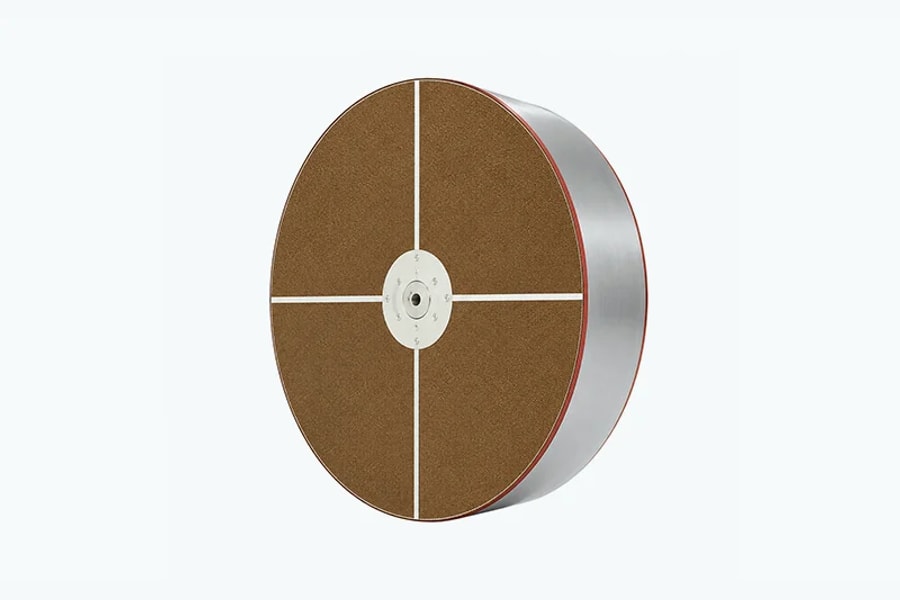
The desiccant rotor is the core component of an adsorption dehumidifier. During operation, it slowly rotates between the process air section and regeneration air section to continuously adsorb and release moisture.
When the rotor stops rotating or rotates at an incorrect speed, the unit cannot maintain stable drying performance.
Possible Causes:
- Rotor motor failure
- Damaged belt, chain, or drive components
- Mechanical blockage
- Loose transmission parts
- Control system malfunction
Troubleshooting Steps:
Check whether the rotor rotates smoothly during operation and inspect:
- Rotor drive motor
- Gearbox or transmission system
- Drive belt tension
- Mechanical connections
- Control signals
If the motor operates but the rotor does not rotate, the problem may be related to the transmission mechanism. If rotation is unstable, inspect the motor protection settings and control system.
Routine checks of the drive assembly can reveal wear or loose parts before they interrupt drying operation, helping keep the equipment serviceable for longer.
3. Desiccant Dehumidifier Cannot Reach Target Dew Point
Many industrial applications require extremely low dew point conditions, including lithium battery manufacturing, semiconductor production, pharmaceutical processing, and cleanroom environments.
When a desiccant dehumidifier cannot achieve the required dew point, the problem is usually related to regeneration efficiency, airflow balance, moisture leakage, or rotor performance.
Possible Causes:
| Cause | Description |
| Low regeneration temperature | Insufficient heat prevents moisture release from the rotor |
| Incorrect airflow ratio | Poor balance between process and regeneration airflow |
| High moisture infiltration | External humid air enters the controlled area |
| Aging desiccant rotor | Reduced adsorption performance after long-term operation |
Troubleshooting Steps:
- Measure supply air dew point using a calibrated instrument.
- Check regeneration heater performance.
- Verify process and regeneration airflow balance.
- Inspect air leakage points.
- Evaluate rotor condition.
If the rotor has been exposed to contaminants or operated beyond its service life, replacement may be necessary to restore low dew point performance.
4. High Outlet Humidity After Dehumidification
A properly operating desiccant dehumidifier should provide stable dry air at the outlet. High outlet humidity usually indicates insufficient regeneration, incorrect airflow adjustment, or problems with the humidity control system.
Possible Causes:
- Low regeneration efficiency
- Incorrect airflow distribution
- Dirty filters
- Blocked air passages
- Incorrect humidity settings
Troubleshooting Steps:
Inspect both process air and regeneration air systems:
- Check regeneration air temperature.
- Measure airflow volume.
- Clean air filters.
- Verify damper positions.
- Review controller settings.
In many cases, reduced regeneration airflow prevents the rotor from releasing adsorbed moisture effectively, causing higher outlet humidity.
5. Regeneration Heater Is Not Working Properly
The regeneration heater provides the heat required to remove moisture from the desiccant rotor. Heater problems directly affect the moisture removal capability of the entire system.
Possible Causes:
- Heating element failure
- Electrical connection problems
- Faulty temperature sensor
- Overheat protection activation
- Heater control component failure
Troubleshooting Steps:
Check the electrical system and confirm whether the heater receives the correct power supply.
Inspect:
- Heater resistance value
- Electrical wiring connections
- Temperature control signals
- Safety protection devices
If the heater operates but the regeneration temperature remains low, check regeneration airflow and temperature measurement accuracy.
6. Regeneration Temperature Is Too High or Unstable
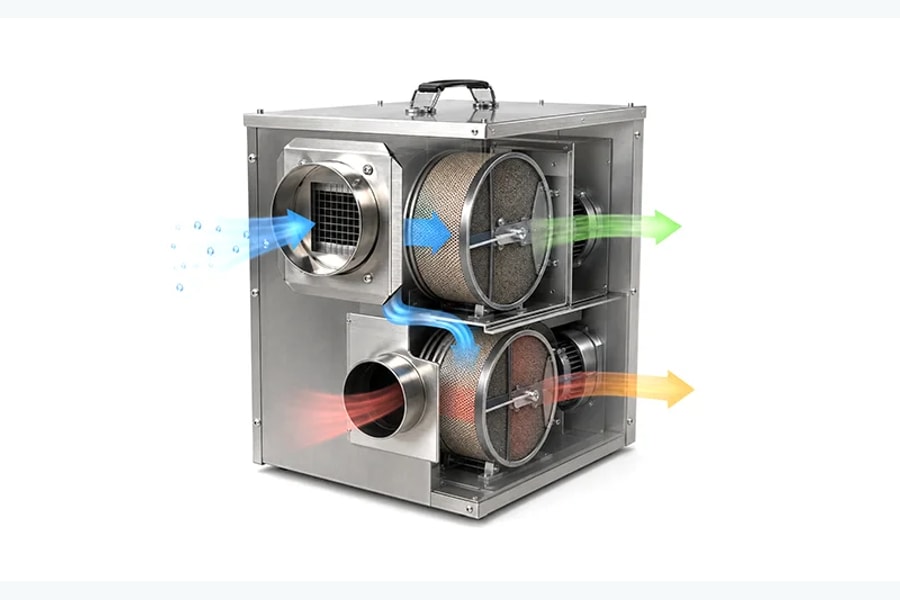
Stable regeneration temperature is essential for efficient desiccant dehumidifier operation. Excessive or unstable temperatures may increase energy consumption, reduce performance, or damage internal components.
Possible Causes:
- Incorrect temperature settings
- Damaged temperature sensors
- Faulty heater control system
- Insufficient regeneration airflow
- PLC or controller errors
Troubleshooting Steps:
- Compare controller temperature readings with actual measurements.
- Check temperature sensor calibration.
- Inspect heater output control.
- Verify regeneration fan operation.
- Adjust operating parameters.
Maintaining proper regeneration temperature improves moisture removal efficiency while optimizing energy consumption.
7. Low Airflow or Weak Air Supply
Airflow is a critical factor affecting desiccant dehumidifier performance. Reduced airflow decreases moisture removal capacity and may cause unstable humidity control.
Possible Causes:
- Dirty air filters
- Fan motor problems
- Blocked ducts
- Excessive system resistance
- Incorrect fan speed settings
Troubleshooting Steps:
Inspect the complete airflow system:
- Clean or replace filters.
- Check fan operation and motor condition.
- Measure actual airflow volume.
- Inspect duct resistance.
- Verify fan speed settings.
Regular filter maintenance is especially important in industrial environments where dust and particles can quickly reduce airflow efficiency.
8. Humidity Sensor or Control System Errors
Modern industrial desiccant dehumidifiers often use PLC controllers, humidity sensors, and communication systems to maintain precise humidity levels.
Sensor or control system errors may cause incorrect operation even when mechanical components are functioning normally.
Possible Causes:
- Sensor calibration problems
- Damaged humidity sensors
- Incorrect controller parameters
- Communication failures
Troubleshooting Steps:
- Compare sensor readings with a calibrated external humidity meter.
- Check sensor installation position.
- Verify calibration status.
- Review PLC and controller settings.
- Inspect communication wiring.
Accurate humidity measurement is essential for maintaining stable environmental conditions, especially in sensitive manufacturing processes.
9. Desiccant Rotor Makes Abnormal Noise or Vibrates
Although desiccant rotors operate at relatively low speeds, abnormal noise or vibration may indicate mechanical problems that require inspection.
Possible Causes:
- Rotor imbalance
- Worn bearings
- Loose mechanical components
- Drive system problems
- Foreign objects inside the unit
Troubleshooting Steps:
Inspect:
- Rotor rotation stability
- Drive motor condition
- Bearing performance
- Mechanical fasteners
- Internal components
If severe vibration occurs, stop operation and inspect the rotor system to prevent further damage.
10. Frequent Alarm Codes or Unexpected Shutdowns
Industrial desiccant dehumidifiers are equipped with protection systems to prevent damage caused by abnormal operating conditions. Frequent alarms or unexpected shutdowns usually indicate underlying equipment problems.
Possible Causes:
- Over-temperature protection
- Fan overload
- Motor faults
- Sensor failures
- Electrical problems
Troubleshooting Steps:
Start by reviewing alarm records from the controller and then inspect:
- Electrical components
- Motors and fans
- Temperature sensors
- Safety protection systems
Early diagnosis of alarm conditions helps reduce downtime and prevents major equipment failures.
Common Desiccant Dehumidifier Troubleshooting Checklist
| Problem | Possible Cause | Troubleshooting Focus |
| Low moisture removal capacity | Rotor or regeneration problems | Check rotor condition and heater performance |
| High outlet humidity | Poor regeneration efficiency | Inspect airflow and temperature |
| Cannot reach target dew point | Capacity or leakage issues | Check moisture load and sealing |
| Rotor not rotating | Drive system failure | Inspect motor and transmission |
| Frequent alarms | Sensor or electrical faults | Review alarm records |
Preventive Maintenance Tips for Desiccant Dehumidifiers
Regular maintenance is essential for maintaining stable performance and extending equipment lifespan.
Clean Air Filters Regularly
Dirty filters increase airflow resistance and reduce dehumidification efficiency. Cleaning schedules should be adjusted according to the operating environment.
Inspect Desiccant Rotor Condition
Regularly check rotor rotation, vibration, and surface condition to ensure continuous moisture adsorption performance.
Monitor Regeneration System
Check regeneration temperature, heater performance, and airflow balance to maintain effective moisture removal.
Calibrate Sensors Periodically
Humidity and temperature sensors should be checked and calibrated regularly to ensure accurate control.
Check Air Leakage
Inspect ducts, seals, and access panels to prevent humid air infiltration that affects performance.
Record Operating Data
Monitoring humidity, temperature, airflow, and energy consumption helps identify abnormal conditions before failures occur.